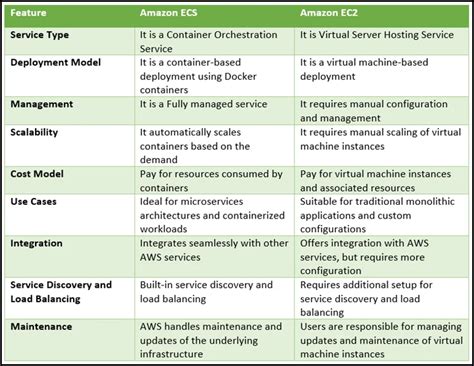
Understanding the cloud computing landscape can be daunting, especially when choosing the right services for your applications. Amazon Web Services (AWS) offers a plethora of options, two of the most popular being Amazon Elastic Container Service (ECS) and Amazon Elastic Compute Cloud (EC2). While both provide computing resources, they cater to different architectural needs and operational styles. The core difference between Amazon ECS and Amazon EC2 lies in their abstraction level and management approach. EC2 provides virtual machines, giving you full control over the operating system and infrastructure. ECS, on the other hand, is a container orchestration service, allowing you to deploy, manage, and scale containerized applications more efficiently. Deciding which to use depends heavily on your application architecture, operational expertise, and desired level of control.
Amazon EC2: Virtual Machines in the Cloud
Amazon EC2 provides virtual servers in the cloud, known as instances. Think of it as renting a computer in a data center. You choose the operating system, install software, configure networking, and manage the underlying infrastructure. This provides maximum flexibility and control. EC2 is suitable for a wide range of workloads, from simple web servers to complex enterprise applications. You can select from various instance types optimized for different use cases, such as compute-intensive, memory-intensive, or storage-intensive workloads. According to AWS, EC2 offers the broadest and deepest compute platform with choice of processor, operating system, networking, security, and purchasing model. Learn more about Amazon EC2.
With EC2, you’re responsible for patching the operating system, managing security updates, and ensuring high availability. This requires a significant amount of operational overhead, especially as your application scales. However, for applications that require specific operating system configurations or direct access to hardware resources, EC2 remains the preferred choice. For example, legacy applications that are not easily containerized or applications that rely on specific kernel modules often run best on EC2 instances. The control comes at the price of increased management responsibilities.
Consider a scenario where you need to run a custom database server with specific kernel parameters. EC2 allows you to configure the operating system precisely to meet these requirements. You have complete control over the file system, network settings, and security policies. While this provides the necessary flexibility, it also means you’re responsible for ensuring the database server is secure, performant, and highly available. This “hands-on” approach is a key characteristic of EC2.
Amazon ECS: Container Orchestration Made Easy
Amazon ECS simplifies the deployment and management of containerized applications. Containers package an application and its dependencies into a single, portable unit. ECS orchestrates these containers, automatically handling tasks such as scheduling, scaling, and health monitoring. You define how your application should run, and ECS takes care of the underlying infrastructure. This reduces operational overhead and allows you to focus on developing and deploying your applications. ECS integrates seamlessly with other AWS services, such as Elastic Load Balancing (ELB) and Auto Scaling, enabling you to build highly scalable and resilient applications. Explore Amazon ECS.
ECS is ideal for microservices architectures, where applications are broken down into small, independent services. Each service can be packaged as a container and deployed independently, allowing for faster development cycles and improved scalability. ECS also supports Docker containers, the industry standard for containerization. This makes it easy to move containerized applications between different environments, from development to production. A key benefit of ECS is its ability to abstract away the underlying infrastructure, allowing developers to focus on writing code rather than managing servers.
For instance, imagine you’re building an e-commerce platform with multiple microservices, such as a product catalog, shopping cart, and payment processor. Each microservice can be packaged as a container and deployed using ECS. ECS automatically schedules the containers across a cluster of EC2 instances or Fargate, ensuring high availability and optimal resource utilization. This allows you to scale individual microservices independently, based on demand.
Key Differences: Control vs. Abstraction
The fundamental difference between Amazon ECS and Amazon EC2 lies in the level of control and abstraction they offer. EC2 provides granular control over the underlying infrastructure, while ECS abstracts away much of the operational complexity associated with managing containers. This choice impacts how you manage your applications, the resources you need to allocate, and the overall cost of operation. When using EC2, you are responsible for the entire stack, from the operating system to the application itself. ECS, on the other hand, handles much of the infrastructure management, allowing you to focus on your application code. This difference is crucial when considering your team’s expertise and the desired level of operational involvement.
Here’s a breakdown of key differences:
- Control: EC2 offers full control over the operating system and infrastructure, while ECS provides a managed container orchestration service.
- Management Overhead: EC2 requires more manual management, including patching, security updates, and scaling. ECS automates many of these tasks.
- Scalability: Both services offer scalability, but ECS simplifies the process of scaling containerized applications.
Consider this featured snippet-optimized paragraph: Amazon ECS is a fully managed container orchestration service that makes it easy to deploy, manage, and scale containerized applications. It eliminates the need for you to install, operate, and scale your own cluster management infrastructure. With ECS, you can launch and stop containers, query cluster state, and access many familiar features, such as security groups, Elastic Load Balancing, EBS volumes, and IAM roles. This streamlined approach contrasts sharply with the manual configuration often required with Amazon EC2.
Choosing the Right Service: A Decision Framework
Selecting between Amazon ECS and Amazon EC2 depends on several factors, including your application architecture, operational expertise, and desired level of control. If you require fine-grained control over the operating system and infrastructure, EC2 is the better choice. However, if you’re using containerized applications and want to reduce operational overhead, ECS is a more suitable option. It’s also important to consider the long-term costs associated with each service. While EC2 may offer lower upfront costs, the ongoing management overhead can quickly add up. ECS may have a slightly higher initial cost, but the reduced operational burden can result in significant savings over time.
Here’s a step-by-step guide to help you decide:
- Assess Your Application Architecture: Is your application containerized? If so, ECS is a strong contender.
- Evaluate Your Operational Expertise: Do you have the resources and expertise to manage EC2 instances? If not, ECS may be a better fit.
- Consider Your Desired Level of Control: Do you need fine-grained control over the operating system and infrastructure? If so, EC2 is the way to go.
- Analyze Your Long-Term Costs: Factor in both upfront and ongoing costs, including management overhead.
- EC2 Advantages: Full control, maximum flexibility, suitable for legacy applications.
- ECS Advantages: Reduced operational overhead, simplified scaling, ideal for microservices.
- **Q: When should I use EC2?**
- A: Use EC2 when you need full control over the operating system and infrastructure, or when running legacy applications that are not easily containerized. It's also suitable for applications that require specific kernel modules or direct access to hardware resources.
- **Q: When should I use ECS?**
- A: Use ECS when you want to deploy and manage containerized applications efficiently. It's ideal for microservices architectures and reduces operational overhead by automating tasks such as scheduling, scaling, and health monitoring.
- **Q: Can I run ECS on EC2?**
- A: Yes, ECS can run on a cluster of EC2 instances. You can also use AWS Fargate, a serverless compute engine for ECS, which eliminates the need to manage the underlying infrastructure.
- **Q: What are the cost considerations for EC2 vs ECS?**
- A: EC2 offers detailed cost control, but requires dedicated management. ECS may have a higher initial cost, but the reduced operational burden can result in significant savings over time. [Cost optimization strategies](https://courthousezoological.com/n7sqp6kh?key=e6dd02bc5dbf461b97a9da08df84d31c) should be evaluated.
Question & Answer :
I’m just getting started on AWS EC2. I understand that EC2 is like a remote computer where I can do pretty much everything I want. Then I found out about ECS. I know it uses Docker, but I’m confused about the relationship between these two.
Is ECS just a Docker install in EC2? If I already have an EC2 and I start an ECS, does it mean I have two instances?
Your question
Is ECS just a docker install in EC2? If I already have a EC2, then I start a ECS, does it mean I have two instance?
No. AWS ECS is just a logical grouping (cluster) of EC2 instances, and all the EC2 instances part of an ECS act as Docker host i.e. ECS can send command to launch a container on them (EC2). If you already have an EC2, and then launch ECS, you’ll still have a single instance. If you add/register (by installing the AWS ECS Container Agent) the EC2 to ECS it’ll become the part of the cluster, but still a single instance of EC2.
An Amazon ECS without any EC2 registered (added to the cluster) is good for nothing.
TL; DR
An overview
EC2- is simply a remote (virtual) machine.ECSstands forElastic Container Service- as per basic definition of computer cluster,ECSis basically a logical grouping ofEC2machines/instances. Technically speakingECSis a mere configuration for an efficient use and management of yourEC2instance(s) resources i.e. storage, memory, CPU, etc.
To simplify it further, if you have launched an Amazon ECS with no EC2 instances added to it, it’s good for nothing i.e. you can’t do anything about it. ECS makes sense only once one (or more) EC2 instances are added to it.
The next confusing thing here is the container term - which is not fully virtualized machine instances, and Docker is one technology we can use to create container instances. Docker is a utility you can install on our machine, which makes it a Docker host, and on this host you can create containers (same as virtual machines - but much more light-weight). To sum up, ECS is just about clustering of EC2 instances, and uses Docker to instantiate containers/instances/virtual machines on these (EC2) hosts.
All you need to do is launch an ECS, and register/add as much EC2 instances to it as you need. You can add/register EC2 instances, all you need is Amazon ECS Container Agent running on your EC2 instance/machine, which can be done manually or directly using the special AMI (Amazon Machine Image) i.e. Amazon ECS-optimized AMI, which already has the Amazon ECS Container Agent. During the launch of a new EC2 instance the Agent automatically registers it to the default ECS cluster.
The container agent running on each of the instances (EC2 instances) within an Amazon ECS cluster sends information about the instance’s current running tasks and resource utilization to Amazon ECS, and starts and stops tasks whenever it receives a request from Amazon ECS. For more information, see Amazon ECS Container Agent. Once set, each of the created container instances (of whatever EC2 machine/node) will be an instance in Amazon ECS’s swarm.
For more information – read step 10 from this documentation: Launching an Amazon ECS Container Instance:
Choose an AMI for your container instance. You can choose the Amazon ECS-optimized AMI, or another operating system, such as CoreOS or Ubuntu. If you do not choose the Amazon ECS-optimized AMI, you need to follow the procedures in Installing the Amazon ECS Container Agent.
By default, your container instance launches into your default cluster. If you want to launch into your own cluster instead of the default, choose the Advanced Details list and paste the following script into the User data field, replacing your_cluster_name with the name of your cluster.
#!/bin/bash echo ECS_CLUSTER=your_cluster_name >> /etc/ecs/ecs.configOr, if you have an ecs.config file in Amazon S3 and have enabled Amazon S3 read-only access to your container instance role, choose the Advanced Details list and paste the following script into the User data field, replacing your_bucket_name with the name of your bucket to install the AWS CLI and write your configuration file at launch time. Note For more information about this configuration, see Storing Container Instance Configuration in Amazon S3.
#!/bin/bash yum install -y aws-cli aws s3 cp s3://your_bucket_name/ecs.config /etc/ecs/ecs.config
Just to clarify it further – you can create containers on your single EC2 instance without ECS. Install any of the containerization technology i.e. Docker and run the create container command, setting your EC2 as a Docker host, and have as much Docker containers as you want (or as much as your EC2’s resources allow).
